# How to Generate Dart code for Parsing JSON in Flutter?
### Let's check how to do automated JSON Serialization.
Here we will be using [random person api](https://randomuser.me/api/) for getting the JSON string.
How's it looks like?
Have a look,
```
[
{
"id": 1,
"name": "Leanne Graham",
"username": "Bret",
"email": "Sincere@april.biz",
"address": {
"street": "Kulas Light",
"suite": "Apt. 556",
"city": "Gwenborough",
"zipcode": "92998-3874",
"geo": {
"lat": "-37.3159",
"lng": "81.1496"
}
},
"phone": "1-770-736-8031 x56442",
"website": "hildegard.org",
"company": {
"name": "Romaguera-Crona",
"catchPhrase": "Multi-layered client-server neural-net",
"bs": "harness real-time e-markets"
}
}
]
```
First of all, it seems a bit complex right?
But it's not.
Let's say my flutter application need the username and email of the person, that's very easy right?
We can use our manual JSON serialization to get the username and email of the person.
But what if we need the address of the person?
We can also use our manual JSON serialization to get the address of the person.
But it will make our code messy and we don't want that.
#### Here comes the power of JSON Generated-Serialization in flutter to the rescue.
Please refer to my previous [article](https://blog.bufferoverflow.me/flutter-json-serialization-manual-serialization). This article is in continuation with [that](https://blog.bufferoverflow.me/flutter-json-serialization-manual-serialization) article.
## Let's Do it.
### Step 1:
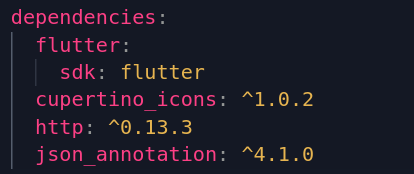
**Add Dependencies in pubsec.yaml file**
>>Add ``JSON_annotation: ^4.1.0`` as dependencies.
>
### Step 2:
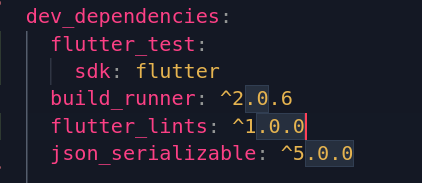
**Add ``build_runner: ^2.0.6`` under dev dependencies.
**
**Add ``JSON_serializable: ^5.0.0`` under dependencies.**
```
build_runner: ^2.0.6
JSON_serializable: ^5.0.0
```
>
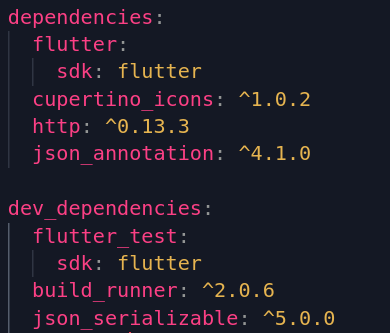
Here's how my dependencies and dev dependencies look like,
>>
### Step 3:
*Create a folder named ``model`` inside the ``lib`` folder.*
It's not necessary but it's good to keep things organized.
### Step 4:
*Create a file named ``person_model.dart`` inside the ``model`` folder.*
Here we will be using the ``JSON_serializable`` package to convert the JSON string into a ``Person`` object.
**import the ``JSON_serializable`` package.**
```
import 'package:JSON_annotation/JSON_annotation.dart';
```
**Create a part of our file.**
```
part 'your_filename.g.dart';
```
This allows the `User` class to access private members in
the generated file. The value for this is *.g.dart, where
the star denotes the source file name.
### Step 5:
**Now add the following code.**
```
@JsonSerializable()
```
Hey but what is this?
>Basicaly, this annotation tells the Dart compiler to generate a class that can be serialized to JSON.
### Step 6:
**Create a class named ``PersonModel``.**
or what ever you want.
It's not necessary but it's good to keep things organized according to the JSON string.
Now let's look back to our JSON string.
```
[
{
"id": 1,
"name": "Leanne Graham",
"username": "Bret",
"email": "Sincere@april.biz",
"address": {
"street": "Kulas Light",
"suite": "Apt. 556",
"city": "Gwenborough",
"zipcode": "92998-3874",
"geo": {
"lat": "-37.3159",
"lng": "81.1496"
}
},
"phone": "1-770-736-8031 x56442",
"website": "hildegard.org",
"company": {
"name": "Romaguera-Crona",
"catchPhrase": "Multi-layered client-server neural-net",
"bs": "harness real-time e-markets"
}
}
]
```
Let's first decide what kind of information we need from the JSON string.
For this example, we need the name, username, email, and address.
Looking at the JSON string, we can see that the address is a JSON object.
Hey but what is a json object?
>A json object is a json array with a single element.
>for example:
```
[
{
"street": "Kulas Light",
"suite": "Apt. 556",
"city": "Gwenborough",
"zipcode": "92998-3874",
"geo": {
"lat": "-37.3159",
"lng": "81.1496"
}
}
]
```
This is a JSON array with a single element.
And **what is a JSON array?**
>A JSON array is a JSON object with an array as its value.
I think we are clear now.
>If not then don't worry, you will get it soon, when you do the code.
### Step 7:
We can declare the name, username, and email as strings since they do not contain any nested JSON objects.
here's how our code looks like,
```
import 'package:json_annotation/json_annotation.dart';
part 'person_model.g.dart';
@JsonSerializable()
class PersonModel {
String name;
String username;
String email;
}
```
**But what about the address?**
It's a JSON object with nested JSON objects.
Declare a new class named ``AddressModel``.
This class will be used to store the address.
Create a new file named ``address_model.dart``,
inside our model folder.
And perform the same steps as we did for ``PersonModel``.
here's how our code looks like in the ``address_model.dart`` file,
```
import 'package:json_annotation/json_annotation.dart';
part 'address_model.g.dart';
@JsonSerializable()
class AddressModel {
String street;
String suite;
String city;
String zipcode;
// GeoModel geo; // Your homework :)
}
```
We are not done yet btw.
Both of our programs are incorrect.
Why?
>because we haven't initialized our constructors.
How do we initialize our constructors? Or how do we even define a constructor?
But first of all, **what is a constructor?**
>A constructor is a function that is called when an object is created.
>>You may refer to my previous article [#Flutter: A short intro to OOP](https://bufferoverflow.me/flutter-a-short-intro-to-oop) for more details.
Let's create a constructor for our ``PersonModel`` class first.
Add this code inside the ``PersonModel`` class,
```
PersonModel(this.name, this.username, this.email);
```
And do the same for the ``AddressModel`` class.
Add this code inside the ``AddressModel`` class,
```
AddressModel(this.street, this.suite, this.city, this.zipcode);
```
Hey Gulshan, what is this ``this.``?
>It's a reference to the current object.
>>It is used to access the properties of the current object.
>>i.e. ``this.name`` is equivalent to ``name``.
>>I think now it's clear.
Let's Jump back into our ``person_model.dart`` file.
Declare a new variable named ``address`` of type ``AddressModel``. And do the changes in our constructor accordingly.
Our ``PersonModel`` would now look like this,
```
class PersonModel {
String name;
String username;
String email;
AddressModel address;
PersonModel(this.name, this.username, this.email, this.address);
}
```
Add the following code inside our ``PersonModel`` class,
```
factory PersonModel.fromJson(Map json) => _$PersonModelFromJson(json);
Map toJson() => _$PersonModelToJson(this);
```
And add the following code inside our ``AddressModel`` class,
```
@override
String toString() => '${street} ${suite} ${city} ${zipcode}';
factory PersonModel.fromJson(Map json) => _$AddressModelFromJson(json);
Map toJson() => _$AddressModelToJson(this);
```
**What are those lines of code?**
Let's break them down.
**What is a factory?**
>A factory is a function that creates an object.
for now, this much info is enough.
You may research more about factories on the web.
**what is _$PersonModelFromJson?**
>It's a private function.
>It's used to create an object from a json object.
**Why am I seeing an error?**
>It's because the files are not generated yet.
And at the end that overrides part inside our ``AddressModel`` class,
is used to just return the string representation of the objects.
In our case, ``street``, ``suite``, ``city``, ``zipcode``.
Here's how our code looks like,
person_model.dart
```
import 'package:json_annotation/json_annotation.dart';
import 'package:your_appname/model/address_model.dart';
part 'person_model.g.dart';
@JsonSerializable()
class PersonModel {
String name;
String username;
String email;
AddressModel address;
PersonModel(this.name, this.username, this.email, this.address);
factory PersonModel.fromJson(Map json) => _$PersonModelFromJson(json);
Map toJson() => _$PersonModelToJson(this);
}
```
address_model.dart
```
import 'package:json_annotation/json_annotation.dart';
part 'address_model.g.dart';
@JsonSerializable()
class AddressModel {
String street;
String suite;
String city;
String zipcode;
// GeoModel geo; // Your homework :)
AddressModel(this.street, this.suite, this.city, this.zipcode);
@override
String toString() => '${street} ${suite} ${city} ${zipcode}';
factory AddressModel.fromJson(Map json) => _$AddressModelFromJson(json);
Map toJson() => _$AddressModelToJson(this);
}
```
Let's now generate the files.
Open the terminal and type,
```
flutter pub run build_runner build
```
And wait for the files to be generated.
Here, you can look that the files are generated and all our errors are gone.
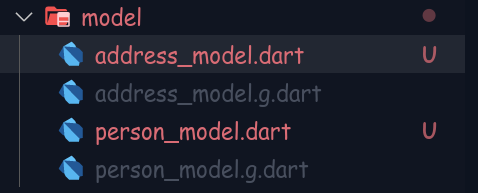
Ahh, if you are thinking that why my files appear red?
It's git stuff. It just means that the files are not committed yet.
And the grey files are ignored files.
let's have a look inside our generated files.
Hey look,
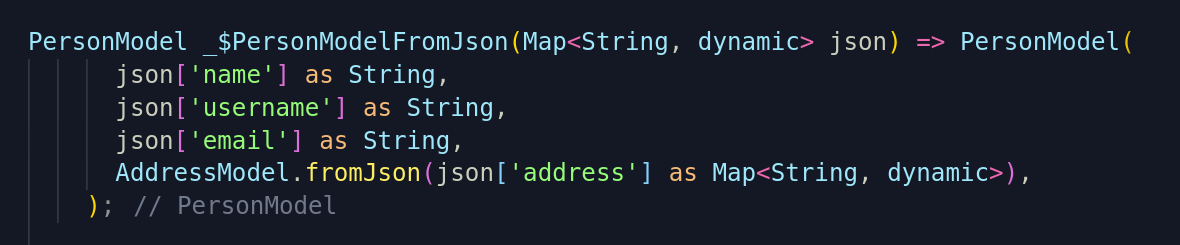
That's what we wrote in our [manual Serialization](https://bufferoverflow.me/flutter-json-serialization-manual-serialization) code.
The only thing we are left with is to use this parsed data in our application.
That can be achieved using ``FutureBuilder``.
Currently, this article became a little bit more complicated, I feel.
So I will be posting about FutureBuilder in a future article.
___
If you are frustrated about how these classes are getting the JSON string,
then please refer to my previous article on [manual Serialization](https://bufferoverflow.me/flutter-json-serialization-manual-serialization).
___
Until then you can refer to [Flutter docs](https://api.flutter.dev/flutter/widgets/FutureBuilder-class.html) for more details.
Or you can also wait for me to write a blog post about this.
Maybe when you are done with this article, I already posted an article about the FutureBuilder.
So have a look at my [site](https://blog.bufferoverflow.me).
Thanks for reading.
Happy Coding :)